VPN Ports — Tips from R-VPN
Ports for Different VPN Protocols
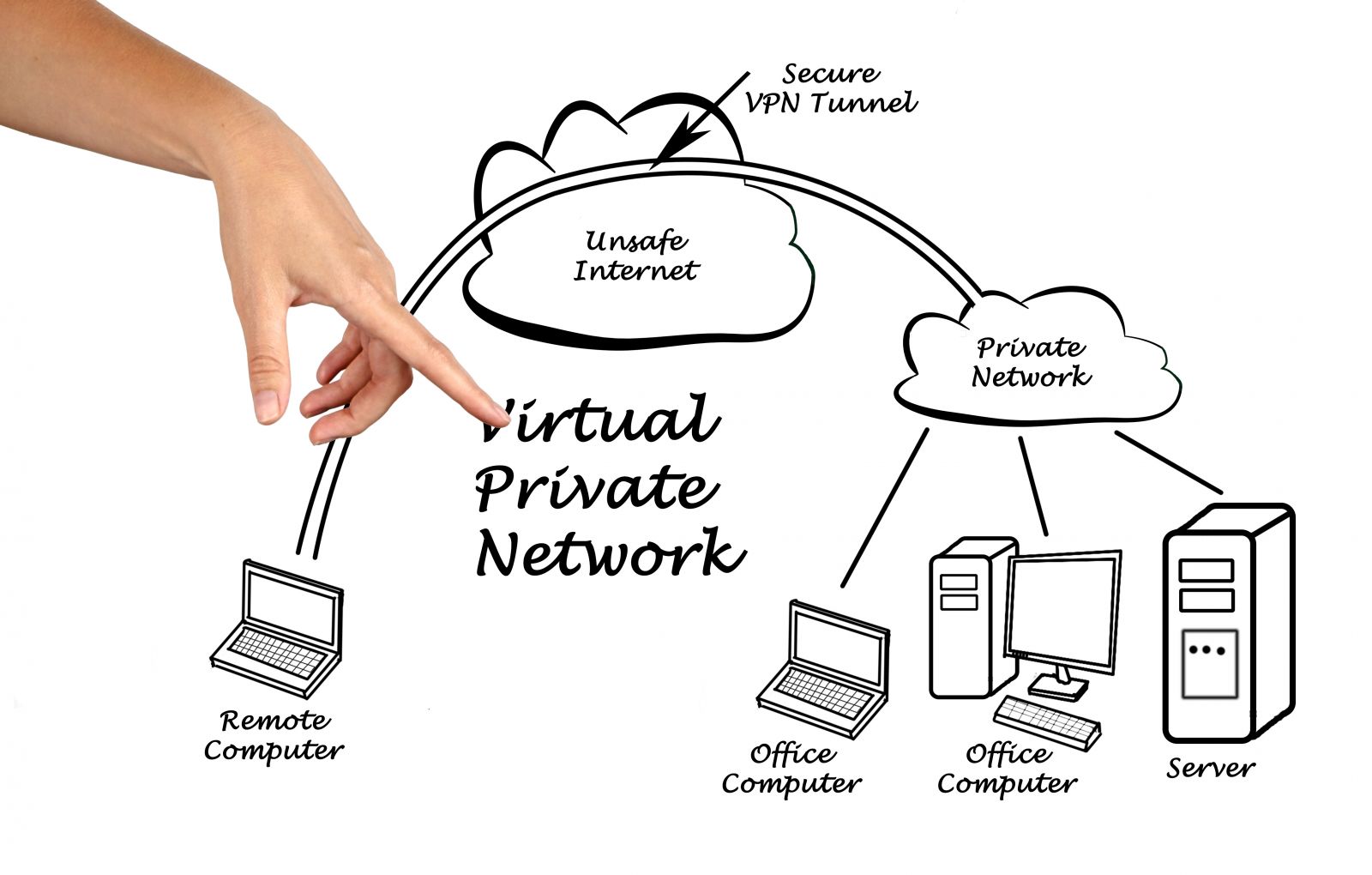
A VPN (Virtual Private Network) is a technology that makes it possible to provide a secure connection between devices over the internet. VPN connections use data encryption and tunnel configuration, which protects the transmitted information from unauthorized access. For a VPN connection to work, ports are needed that are open on the VPN server and on the VPN client.
Our VPN service will help you bypass surveillance, the blocking of resources by Roskomnadzor, ISPs, and company administrators, as well as neutralize the geographic blocking of domestic and international services such as Netflix, Amazon, ChatGPT, and so on. You can also use the VPN to make purchases on sites you couldn't visit because of sanctions or other economic and political restrictions.
In addition, thanks to unlimited speed and access to data for just $4 a month (which is far more affordable than our competitors), you get the best possible offer! You can also take advantage of our discounts for regular customers or promo codes for a free trial period if you register on our website using your email and password. Our technical support team is always ready to provide any help you may need when setting up a connection. We use five modern technologies to access the Internet: IKEv2, WireGuard, Shadowsocks, L2TP, and OpenVPN.
You can use one of our apps or configure your device running macOS, iOS, Linux, Windows, or Android with preset parameters. This will give you access even in cases where there are restrictions on downloading apps in your region. Our service offers a secure connection using powerful encryption algorithms.
By connecting to our VPN service, you will be able to access any site and be confident that your information is completely safe from potential risks such as hackers and government agents. If you have any questions or doubts about settings, quality of service, or security, our technical support or online consultants are always ready to help.
Follow new updates on our Telegram channel (https://t.me/rvpn_info) and visit the Telegram chat (https://t.me/rvpn_chat), where you can send requests, take part in contests, get rewards, and receive special promo codes!
There are several VPN protocols, and each of them uses its own ports:
- PPTP (Point-to-Point Tunneling Protocol) is one of the oldest VPN protocols, which uses TCP port 1723 to establish the connection and the GRE protocol to transmit data.
- L2TP (Layer 2 Tunneling Protocol) is a more secure VPN protocol that also uses TCP port 1723 to establish the connection and the IPSec protocol to encrypt data.
- SSTP (Secure Socket Tunneling Protocol) is a VPN protocol that uses TCP port 443 (the same port used for HTTPS connections) and SSL encryption to secure data.
- OpenVPN is an open VPN protocol that can use both TCP and UDP ports depending on the settings. Ports 1194 (UDP) and 443 (TCP) are usually used.
A VPN Server in Our Home
A VPN server in a home network lets remote users connect to the local network over the internet. To create a VPN server in a home network, you can use special software such as OpenVPN, or use the VPN server feature built into some routers.
To set up a VPN server, you need to open certain ports on the router.
Which Ports to Open on Our Router
To set up a VPN server on a router, you need to open the ports used for the corresponding VPN protocol. For example, for OpenVPN, you need to open ports 1194 (UDP) and 443 (TCP). For PPTP — ports 1723 (TCP) and the GRE protocol.
In addition, to ensure the security of the VPN connection, you need to configure the router to forward ports only to the VPN server, and also configure filtering and access control to prevent unauthorized access to the network.
An Example of Opening Ports for a VPN
Here is an example of configuring a router to create a VPN server using the OpenVPN protocol:
- You need to go into the router settings and find the section responsible for configuring ports and port forwarding.
- Create rules to forward ports 1194 (UDP) and 443 (TCP) to the local IP address where the VPN server will run.
- Configure access control to prevent unauthorized access to the VPN server.
- Configure OpenVPN on the VPN server and on the client devices.
After completing these steps, you can use the VPN server to remotely connect to the local network.
Conclusions
VPN ports are an important aspect of setting up a VPN server. Each VPN protocol needs its own ports, which must be opened on the router. Setting up a VPN server in a home network requires completing certain steps, including opening ports, port forwarding, and configuring security. Properly configuring VPN ports ensures the security of the connection and lets you use a remote connection to the local network from anywhere in the world.
Ten of the Most Frequently Asked Questions and Answers About VPN Ports:
Why are VPN ports needed?
Answer: VPN ports are needed to transmit data between the VPN server and the client.
Which VPN protocols use ports?
Answer: Each VPN protocol uses its own ports; for example, PPTP uses TCP port 1723, while L2TP uses UDP port 1701.
Which ports need to be opened for OpenVPN to work?
Answer: For OpenVPN to work, you need to open UDP port 1194 or TCP port 443.
Can I use VPN ports opened on another device?
Answer: No, VPN ports need to be opened on the router or VPN server.
How do I configure VPN ports on a router?
Answer: Configuring VPN ports on a router is done through the port settings and port forwarding section.
Which ports should my VPN server use?
Answer: Each VPN server can use different ports, but you need to open the ports corresponding to the VPN protocol being used.
How do I check whether the necessary VPN ports are open?
Answer: There are many online utilities that can check whether the necessary VPN ports are open.
How do I configure security for VPN ports?
Answer: You need to configure filtering and access control to prevent unauthorized access to the network.
How do I configure VPN ports on client devices?
Answer: VPN ports on client devices are configured automatically when setting up the VPN connection.
What problems can occur if VPN ports are not configured correctly?
Answer: Incorrectly configuring VPN ports can lead to a non-working VPN connection or to network security vulnerabilities.