- Articles -
A VPN is a technology that allows users to transmit data anonymously over the Internet and protects personal information from prying eyes. This is achieved by creating an encrypted tunnel between the user’s computer and the VPN server. However, there are several factors that can reduce the overall security of a VPN connection.

A VPN allows users to browse the web and communicate online anonymously while protecting their privacy. macOS is a popular operating system, and many users are looking for free VPN solutions to use on their Macs.
VPN providers generally allow users to choose the country in which their server is located. Many users make this choice without much thought, not realizing that the country selected for a VPN server significantly affects access to desired resources, the quality of encryption, and data transfer speed.

After Roskomnadzor blocked a large number of services, websites, and social networks across the Russian Federation, many users began actively using VPN services. As a result, the next logical step was the restriction of VPNs themselves, despite the fact that regulatory authorities had previously stated that using VPN services was completely legal.
Automatic VPN connection is a mechanism that allows your device to automatically configure and connect to a VPN server when a computer or mobile device is turned on. This feature is especially convenient for users who travel frequently and need reliable data protection when using public or unsecured networks.
In today’s digital world, protecting personal data and maintaining online privacy are becoming increasingly important. One effective way to stay protected is by using a VPN (Virtual Private Network). In this article, we’ll explain how to install a free VPN and what you should consider when choosing one.

Many companies that offer original or paid content are concerned about protecting it, which is why they continuously implement systems designed to block VPN connections. As a result, access to websites, platforms, and content may be restricted either entirely or within specific regions. In such cases, a fast and effective VPN block bypass can help restore access to content from anywhere in the world.
VPN for Laptop VPN is a network technology that allows users to connect to remote networks through an encrypted connection. This means all data transmitted between your computer and the network is encrypted and inaccessible to unauthorized parties.
How to Find a VPN A VPN (Virtual Private Network) is a network service that allows users to connect to the internet through an encrypted connection. This ensures the security and privacy of your information online.
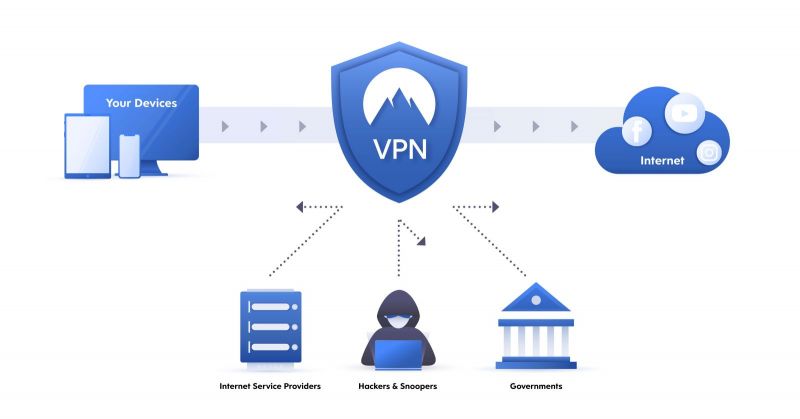
Types of VPN VPN is a technology that allows for the creation of a secure connection between two devices or between a device and a network. This connection uses a special protocol that protects data from interception and unauthorized access.
VPN Speed VPN speed depends on many factors, such as the quality of your network connection, the distance to the server, the number of service users, and the technology you are using. Typically, this speed is lower than a direct internet connection.

How to Completely Remove a VPN from Your Computer (Mac, Windows, Linux, Android)

VPN Hacking A VPN allows you to create a secure connection between two devices over the internet. When using a VPN, it becomes more difficult for others, including your Internet Service Provider, to track you. VPN services also replace your location data, giving you the ability to access blocked resources. Furthermore, using a VPN protects your personal data and its integrity during transmission over the network.
For a VPN to work reliably, you need a dependable service with stable protocols and correct settings. That service is R-VPN — a working, fast and secure VPN built for tough network conditions.
A Virtual Private Network can be incredibly useful, but it also comes with its own set of drawbacks. Before you start using a VPN, it's important to understand both its advantages and its limitations.
A VPN, or Virtual Private Network, is a specialized service that allows users to accomplish several tasks. Most commonly, it's used to access websites that have been blocked by the relevant authorities in a given country. In the Russian Federation, this is done at the direction of Roskomnadzor (the Federal Service for Supervision of Communications, Information Technology and Mass Media). A similar situation can be encountered in other countries as well, where Russian citizens might travel and find their usual online resources blocked.
Virtual Private Networks (VPNs) are a popular way to secure your activities and data on the internet. VPNs are often used by companies to protect employees' personal and corporate data, as well as by individuals who want to shield their online identity and browser activity from hackers and excessive surveillance.
Setting up a VPN on your router can be beneficial if you want to protect your network connection or ensure secure access to the network through public Wi-Fi networks. Before configuring a VPN on your router, make sure you have an active service subscription and login credentials. Also, ensure you have access to your router's web interface.

Provider Information: You need access to the VPN server address, username, and password. You can obtain this information from your provider or find it online if you're using a free service.

To install a VPN on your Android device, follow these steps:
Internet security is becoming increasingly important in this era of rapid information technology development. Specifically designed to address this issue, we offer the R-VPN service, which can help you solve most online problems and guarantee your internet security. With R-VPN, you'll avoid surveillance by cybercriminals and government monitoring agencies (like Roskomnadzor), bypass blocks on internet resources, and seamlessly make purchases in online stores and conduct electronic payments using any currency.

A VPN (Virtual Private Network) is a technology that allows you to create a secure and protected internet connection to maintain your anonymity, keep your private information safe from third parties, and ensure secure connections on public networks. VPNs can also be used to bypass restrictions and censorship imposed on the internet in certain countries.
VPN services provide website unblocking capabilities with encrypted data transmission and concealment of the user's physical location. They're essential when you need to access websites blocked by Roskomnadzor or similar agencies in other countries where users might be located. However, to maximize speed and utilize all available features, you'll need to properly configure your VPN connection.
Looking for a safe and unrestricted internet experience? The solution is here – R-VPN service. Our service helps you avoid persistent hackers and government surveillance, bypass blocked websites, and conduct online shopping and electronic payments without issues. R-VPN is a simple, reliable, and affordable solution for your online security.
R-VPN is your ideal partner for safe and free internet access. Our VPN service is designed to solve many online problems, providing you with complete protection on the global web. With R-VPN, you can rest assured that hackers and government surveillance agencies cannot harm your privacy. Internet blocks will no longer prevent you from getting the information you need, and secure shopping and electronic payments will become a reality.

VPN Not Working: Potential Causes and Solutions
Do you need security on the internet? Want to maintain your privacy in the online world? We invite you to connect to R-VPN, a superior VPN service that helps solve numerous problems related to internet security. With our help, you can avoid surveillance by hackers and government monitoring agencies, bypass blocks on internet resources, and seamlessly shop online and conduct electronic payments.

Finding a free VPN for Windows that is both flexible and reliable might seem like a daunting task. Fortunately, there are many options you can find quickly if you put in a little effort. In this article, we'll explore the benefits of using a free VPN for secure internet access from your computer, with a special focus on Russian servers with public IP addresses.
The internet is a fantastic source of information and entertainment, but it can also be a dangerous place. Hackers and government agencies can monitor your online activity and get hold of your personal data. But don't worry – let us introduce you to R-VPN, a service that can solve a multitude of online problems and ensure your safety on the internet.
Secure your online presence with a free, no-registration VPN from R-VPN. Since you don't provide the service with any of your personal details, this guarantees that your private information and payment details won't fall into the wrong hands. Plus, you'll be able to hide your location data, which is crucial for accessing online resources blocked in your country.
Virtual Private Networks (VPNs) with server addresses in multiple countries are becoming increasingly popular in today's world. They provide users with a secure internet connection, alongside anonymity and freedom. What's more, many private, free VPN servers offer a fantastic way to enjoy all these benefits without spending a fortune.
If you're looking for a safe way to use public Wi-Fi, it's important to understand both the benefits and the risks of Virtual Private Network (VPN) applications. These programs don't just help you access blocked websites and online services; they also work to ensure your anonymity and keep your personal information safe.
Installing a VPN service on your PC expands your online capabilities by protecting your data and allowing you to visit blocked websites and applications. While there's a wide array of these services available, choosing the right free VPN for Windows requires balancing performance, ease of use, and security.
When Was the Last Time You Used Public Wi-Fi? Maybe it was at your favorite café, a hotel lobby, or while waiting for a flight. It’s convenient, sure — but did you know that when you connect to public Wi-Fi, you become an easy target for hackers? Unless, of course, you’re using a VPN.
In 2026 the VPN stopped being a niche tool. Today the popularity of VPNs is growing rapidly — which VPN is trending now — is not just a question but a query racking up thousands of views. Users want to know: which service actually works fast, reliably and securely? Here are the current trends and favorites of the year, based on expert reviews, statistics and real-world tests.
In 2026 queries like "which VPN works in Russia" and "VPN extensions in Yandex Browser" stay consistently at the top of search engines. No surprise: users are looking for a fast, convenient way to bypass blocks, open YouTube, Instagram or TikTok, and stay anonymous. One popular option is VPN extensions for Yandex Browser. But are they really safe and effective? Let's figure it out.
In 2026 the VPN has fully turned into a basic digital habit. In Russia it's not only a way to bypass blocks and traffic "throttling," but also a privacy tool for work, business and study. Below is the current state of the market and which VPN works now and will keep working under the new conditions.
A VPN has become an essential tool of digital freedom. Even so, it still hasn't been banned outright — even in countries with heavy censorship and crackdowns on dissent. Why is that?
Looking for a reliable VPN and reading reviews? Be careful — VPN reviews and how they get faked — is a topic your safety depends on. In this article we explain why reviews are so easy to fake, and how to tell the truth from the fakery. Why are fake reviews so popular?
Just 10 years ago, a VPN was seen as a tool "for IT people" or for those who wanted to reach blocked sites. Today, though, a VPN has become a basic essential for any internet user. From students and gamers to businesspeople and journalists — everyone is looking for answers to the question: which VPN works best and why you can't go without one anymore.
Today the smartphone is the main tool for communication, work, entertainment and shopping. But the threats are growing right alongside it: surveillance by providers, app blocks and personal data leaks. That is exactly why more and more users are looking for a mobile VPN so they can use the internet freely and safely. In this article we'll break down which mobile VPN is best to choose, which apps and protocols work in 2026, and what their advantages are.

In 2026, more and more users are wondering which VPN server to choose to make their internet fast, secure, and unrestricted. This question is especially relevant for residents of the former CIS countries, where blocks and traffic filtering keep getting stricter. In this article, we'll figure out which VPN servers work best, how European, American, and Asian connection points differ, and why choosing the right server directly affects speed and anonymity.
In 2025, new rules for using VPNs come into force in Russia. There's no outright ban, but fines for improper use have increased, and the list of restrictions has grown wider. Simply connecting to a VPN is still not a violation if you use it to protect your data or for remote work. But bypassing blocks and searching for prohibited content can now get you a citation.
Amid tightening internet censorship, more and more users are asking: which VPN works, and which VPN works in Russia right now? Site blocks, restricted access to YouTube, Instagram, Telegram, Netflix, and even news outlets — all of this has become a familiar part of online reality. An ordinary browser no longer cuts it. You need an effective and stable tool — and that tool is a VPN. But does just any VPN work? Sadly, no. In this article you'll learn which VPN actually works, what to look for, and why R‑VPN is worth trying right now.

Lately, questions like “How do I connect a VPN through Telegram?” or “Should I use a VPN bot?” have been popping up more and more across the internet and social media. The reason is simple — it really is convenient and fast. You don't need to install, configure, or register anything. Just open a chat with the bot, press a couple of buttons — and there's your VPN. Sounds appealing? It does. But how safe it is — that's a big question. In this article, we'll break down exactly how VPN bots work, why they've become popular, and why this “lightweight” approach isn't the best choice if privacy and stability matter to you.

When it comes to protecting personal data online, most users think of a VPN. But few stop to consider which protocol the VPN connection actually runs on. And yet it affects everything — from speed and stability to the level of anonymity. Today, most services have OpenVPN, WireGuard, IKEv2, and other time-tested solutions in their arsenal. But recently, the name of a new player has been growing louder — Amnezia WG. What is this protocol, how does it work, why do those who understand privacy choose it, and how can you try it out? Let's go through it step by step.